
Dependency bar
The bar at the bottom of the Dependencies view controls which edges the dependency graph draws and how.
Edges shown
Section titled “Edges shown”Tick which edge types are drawn, with All, None and Invert as shortcuts. The card shows the lines of the types that are on.
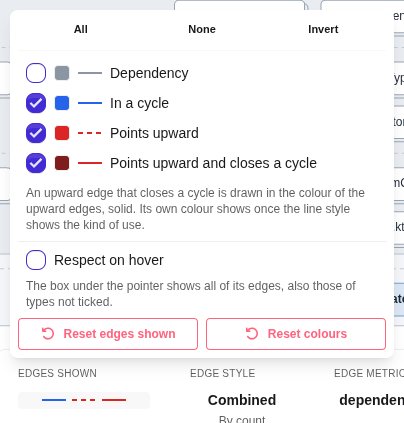
- The color swatch in front of each type changes its color.
- Respect on hover: the box under the pointer shows only its edges of the ticked types, instead of all of them.
- Reset edges shown brings back the default: edges in cycles and pointing upward, no plain dependencies, and every edge on hover. Reset colours restores the default colors.
Edge style
Section titled “Edge style”The Edge style card names how edges are drawn and how thick they are. It opens Edges drawn:
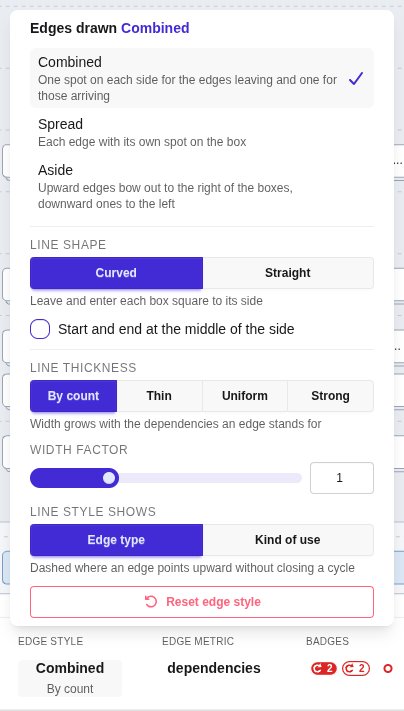
- Combined: one spot on each side of a box for the edges leaving and one for those arriving. The default.
- Spread: each edge with its own spot on the box.
- Aside: upward edges bow out to the right of the boxes, downward edges to the left.
- Line shape: Curved (the default) leaves and enters each box square to its side, Straight draws a straight line from box to box. Not offered for Aside, whose edges are always bows.
- Start and end at the middle of the side: Combined only. Bundles the edges of a side at its middle.
- Line thickness: By count (width grows with the dependencies an edge stands for, the default), Thin, Uniform or Strong (grows twice as much).
- Width factor: scales the width of every edge.
- Line style shows: Edge type dashes the edges that point upward without closing a cycle; Kind of use lets the dashes and arrowhead tell how one declaration uses the other, such as Inherits from, Implements, Creates or Returns.
- Reset edge style restores all of these.
Edge metric
Section titled “Edge metric”Picks the edge metric of the map the graph draws. With dependencies, the edges carry the types above.
Badges
Section titled “Badges”For a map with declarations: tick which badges closed boxes carry, with All, None and Invert as shortcuts.
- Cycles between files: the cycles between different files that a box hides.
- Cycles inside a file: the cycles that stay inside single files.
- Declaration in a cycle: a ring on a declaration that takes part in a cycle.
- Upward dependencies inside: the upward dependencies a closed box hides.
Reset badges shows every badge again.
Hierarchy
Section titled “Hierarchy”For a map that declares packages: Files nested in their Folders (the default) or Packages. With Packages, the files sit in the packages their declarations declare instead of the folders they lie in.