
Dependency inspector
The inspector beside the dependency graph explains the selected file, declaration, folder, package or edge:
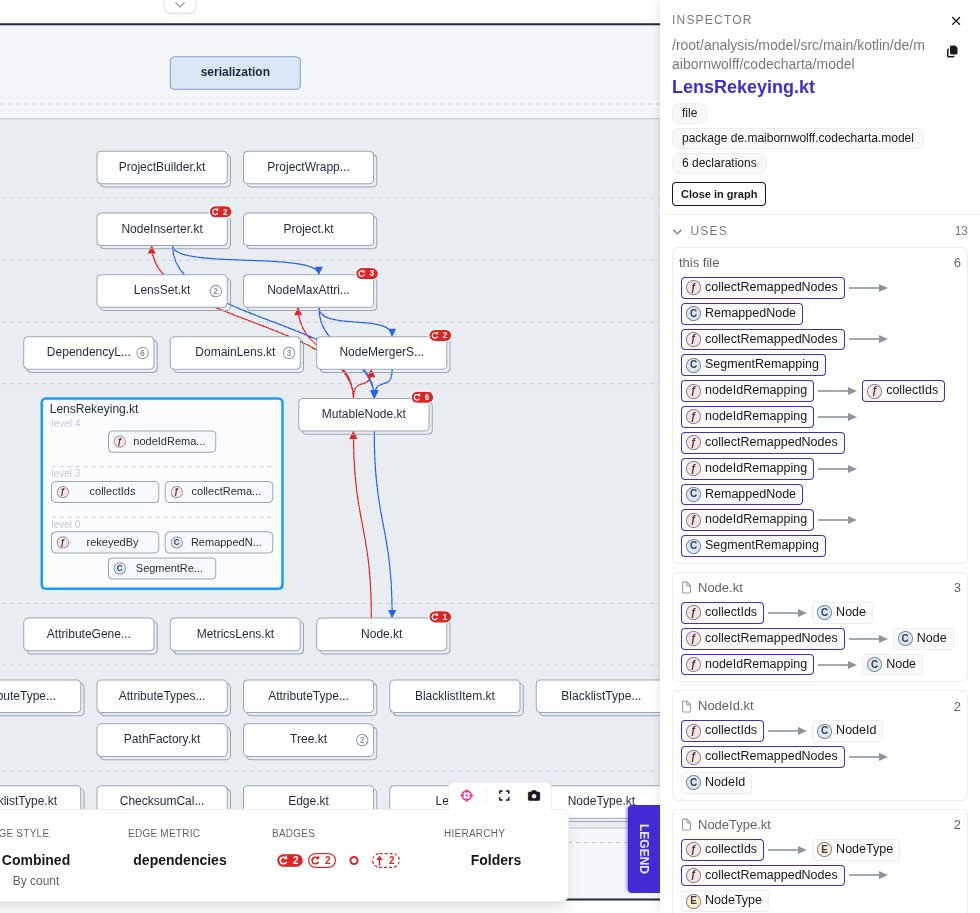
- The header names the box and its parent (click the parent to select it), with badges such as file, its package, its number of declarations and its cycles. The copy button copies the path. Open in graph and Close in graph open or close the box without a double-click. For an edge, Unfold in graph opens its ends down to the declarations it connects.
- Cycles lists every cycle the box takes part in, step by step, with Show in graph to mark it.
- Upward lists the upward dependencies, also with Show in graph.
- Uses and Used by list the dependencies going out and coming in, grouped by file, with the kind of use and the edge type.
- Declarations lists the declarations of a file.
- For a selected edge, Stands for lists the single dependencies the edge stands for.
For a box, a section opens and closes with a click on its title; long lists end in and N more. Pointing at a row marks the boxes and edges it names in the graph. Close inspector (✕) closes it, and its left edge resizes it like the Inspector of the Metric view.